16 Jul 2026
Walk into any coworking space, university library or coffee shop and you will see the same thing: a dozen near-identical silver laptops, black camera bags and white earbud cases. Expensive tech has never looked more generic, which makes it easy to grab the wrong one and hard to reunite with the right owner. Tagging your devices solves that — but the way you do it matters. Writing your phone number on the back of a MacBook works, and also hands your personal details to everyone who picks it up. This guide explains how to label laptops, tablets, cameras and other gear so they come back to you, without putting your private information on display.
Why Engraving Your Number on a Laptop Is a Bad Idea
The instinct to scratch or sticker your phone number onto a device is understandable, but it creates a new problem. Anyone who handles your laptop — in a shared office, on a train, at a repair shop — can read, photograph or note that number. For students living in shared housing and commuters using busy public spaces, that is a lot of strangers with your direct line. And once it is engraved, you cannot change or remove it. You end up trading one risk for another.
What a QR Sticker Does for Electronics
A QR sticker gives you the same "please return this to the owner" function with none of the exposure. The sticker shows no personal information at all — just a code. A finder scans it, reaches a secure page, and sends you a message through a private relay. You are notified instantly and reply on your own terms, while your name, number and address stay hidden. If you ever sell the device or want to change your contact details, you update your profile rather than peeling anything off.
Won't a Sticker Damage My MacBook — and Can I Remove It?
This is the most common hesitation, and the answer is reassuring. A good-quality device sticker uses a residue-free adhesive designed for electronics, so it holds firmly in daily use but does not leave marks on aluminium, glass or plastic when removed. Thin vinyl sits flush on a laptop lid or the underside, on the back of a phone case, or on a camera body without getting in the way. If you upgrade or resell, it peels off cleanly.
QR Sticker vs Find My vs AirTag for Gadgets
These are not competitors so much as different layers. Find My and similar built-in tools tell you roughly where a device is, as long as it has power and signal. An AirTag adds location tracking to something that has no tracking of its own, like a camera bag. A QR sticker does something neither does: it lets the person who finds your device contact you directly and privately, with no app and no battery involved. For a full breakdown of where each one helps and where it falls short, see QR Tags vs AirTags. Most people who take their kit seriously end up combining tracking for theft with a QR tag for everyday returns.
Best Places to Put a Tag on Your Devices
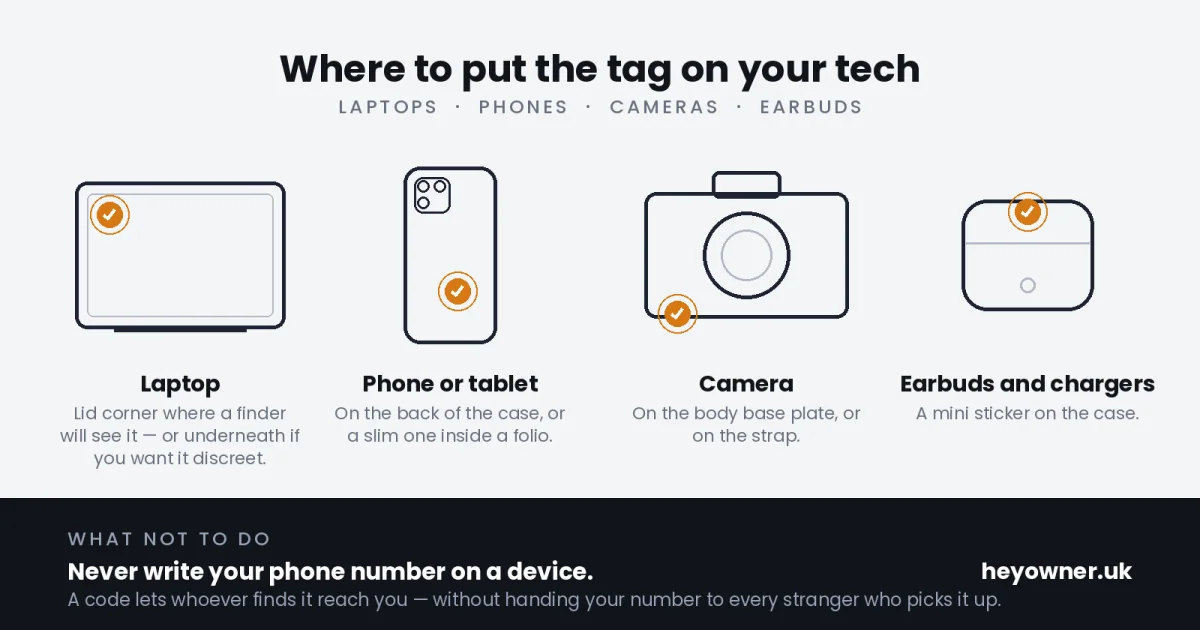
- Laptop — on the lid corner where a finder will see it, or the underside if you prefer it discreet.
- Phone and tablet — on the back of the case, or a slim sticker inside a folio.
- Camera — on the body base plate or the strap; ideal for bodies and lenses that look identical at events and shoots.
- Earbuds and chargers — a mini sticker on the case or that easily-mixed-up laptop charger.
Especially Useful for Students and Commuters
If you carry valuable tech through busy, shared spaces every day, the odds of a mix-up or a moment's forgetfulness add up. On a packed campus or a rush-hour train, a QR sticker is the difference between a lost laptop and a quick message from whoever picked it up. It is a small, one-off setup that quietly works in the background for the life of the device. When you are ready, the electronics use-case page shows the full picture, and your first tag is free.
Read next: Lost a laptop or phone already? Here is how to get it back.